Skip to content
FlyerCo
FlyerCo
  • Home
  • Member Login
  • Flyer Designs
  • Pricing
  • Blog
  • Support
    • Contact Us
    • Knowledge Base
Looking for help?
< All Topics
  • Main
  • Account
  • I no longer use Flyerco, how do I cancel my account?

I no longer use Flyerco, how do I cancel my account?

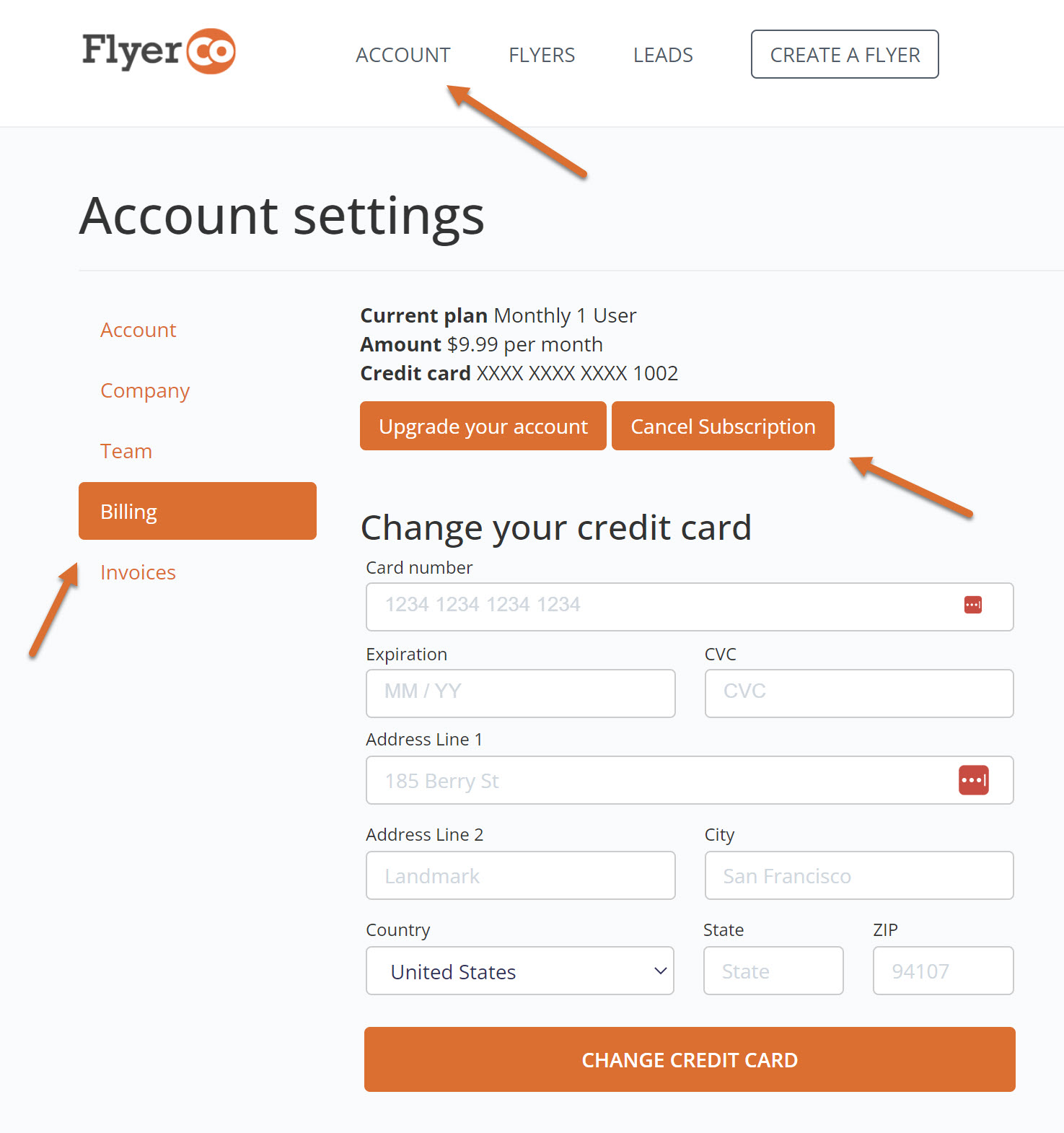
We are sorry to hear you now longer wish to continue using Flyerco. You can follow the steps below to cancel you account.

  1. Log into your account
  2. Click the Account tab at the top of the page
  3. Navigate to the billing section
  4. Click on the “Cancel” button

I no longer use Flyerco, how do I cancel my account?

Previous How do I update my credit card information?
Next I forgot my password, how do I reset it?
Real Estate Quotes | Blog | Privacy Policy | Terms & Conditions | Contact Us
© 2026 All Rights Reserved - FlyerCo.com